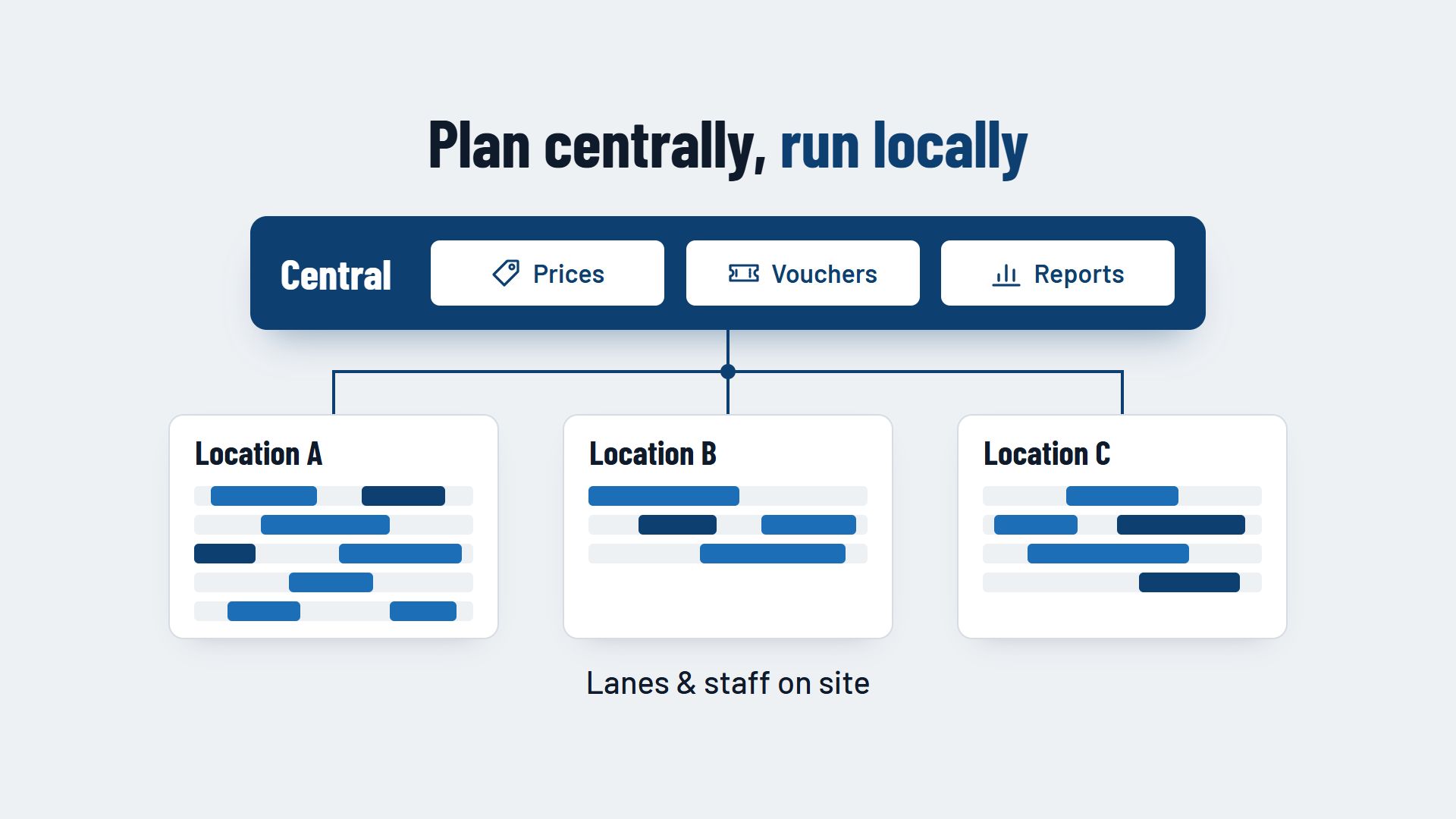
A booking system for multiple locations runs all your bowling centres in one system: you manage prices, vouchers, customer data and reports centrally, while each centre controls its lanes, opening hours and staff on site. All locations work to the same rules, and each centre manager still keeps control of their own capacity.
Why separate systems slow you down with several centres
Many operators add a second or third centre step by step. Often each centre brings its own system, or the proven system from the first centre is simply copied. That works for a while, but it takes effort day to day:
- Double maintenance. A price change or a new company package has to be entered in each system separately, and sooner or later the details no longer match.
- Vouchers that only work in one place. A guest who bought a voucher at one centre is turned away at the other.
- No overall picture. Anyone who wants to know how all centres performed last month has to pull figures from several programs into one spreadsheet.
- Guests without an overview. Someone who cannot find a free slot on the website never learns that the neighbouring centre still has lanes free that evening.
What you should manage centrally
Everything that should be the same for all centres, or that you want to compare across locations, belongs at head office.
Prices and packages
Set up your prices, packages for children's parties or company events, and your extras once. Where a centre should differ, for example because of different facilities, allow a variation for that location instead of maintaining a separate package. How to tier prices by time of day and season is covered in the article Dynamic and seasonal pricing for bowling lanes.
Vouchers
Vouchers that are valid at every centre are a real advantage for your guests. This requires all locations to access the same pool of vouchers. Agree internally how revenue is settled when a voucher is sold at centre A and redeemed at centre B.
Customer data
A guest who bowls at several centres should not be set up more than once. A shared customer base makes booking histories and newsletters simpler. Clarify which rules apply to shared customer data with your adviser or your data protection officer.
Reports and user permissions
Reports and roles also belong at head office. The sections further down describe what both can look like.
What each location controls on site
Everything that depends on the building, the team and the centre's surroundings stays local:
- Lanes. Each centre has its own number of lanes, its own areas and its own blocked times for maintenance.
- Opening hours. Public holidays, school holidays and local habits differ from place to place.
- Staff. The centre manager plans who works on which evening based on the centre's bookings. How that works is covered in the article Staff planning in a bowling centre.
- Local events. A league night, a party during the local funfair or a tournament affects only one location and blocks the lanes there.
One booking page or one for each location?
There are two common approaches for online booking:
- One shared booking page with a choice of location. The guest first chooses the centre, then the date and lane. This suits centres that appear under one brand and guests who choose between them, for example in the same town or region.
- A separate booking page for each location. Each centre has its own page, fed from the same system. This suits centres that are far apart or are known under their own names.
In both cases, availability should come from the same system. Then the guest always sees the real free lanes at the chosen centre, and a voucher works on every page.
Comparing locations in reports
A central report shows you what a single centre cannot show on its own. Compare the locations, for example, by:
- lane occupancy by day of the week and time,
- revenue from lanes, packages, food and drink,
- share of online bookings compared with phone reservations,
- cancellations and no-shows,
- vouchers sold and redeemed at each centre.
Use fair yardsticks when you compare. A centre with only a few lanes reaches a different occupancy than a large centre in a busy location. If one location stands out on a figure, ask the team on site first before drawing conclusions. There is often a local explanation, such as roadworks outside the door or a new leisure attraction nearby.
Roles and permissions for centre managers
Roles let you decide who can see and change what in the booking system. A simple split for multiple locations looks like this:
- Senior management. Sees all centres, changes prices, packages and vouchers, and has access to all reports.
- Centre management. Manages lanes, opening hours, blocked times and local events for their own centre and sees its reports.
- Counter staff. Take bookings, change them and check guests in, for their own centre only.
Give permissions as narrowly as possible and only as widely as needed. Someone who covers another centre as a stand-in gets an extra permission for it, not access to everything.
Bringing several centres onto one system in five steps
1. Take stock
For each centre, list which lanes, prices, packages, vouchers and customer data exist and which system they are in today. This shows you where the centres already work the same way and where they do not.
2. Set central and local rules
Using the list above, decide what will be managed centrally and what locally in future. Standardise package names and prices before you move them into the new system.
3. Start with a pilot centre
Switch one centre first, ideally one with an experienced team. There you find out what is still missing in the settings before all the others follow.
4. Transfer open bookings and vouchers
Dates that are already booked and vouchers that have not yet been redeemed must be valid in the new system. Plan the transfer for a quiet week and then spot-check that everything has come across.
5. Switch the remaining centres one after another
Switch the other centres one at a time, not all on the same day. Train each team before the change, and decide who helps with questions in the first week.
Conclusion: plan centrally, run locally
A booking system for multiple locations saves you double maintenance and shows you all your centres at a glance. It is most useful when it is clear what head office manages and what the team on site decides.
Which features a booking system for bowling centres should have overall is covered on the page Booking system for bowling centres. How several locations can come together in one system can be seen, for example, at Flexybox.