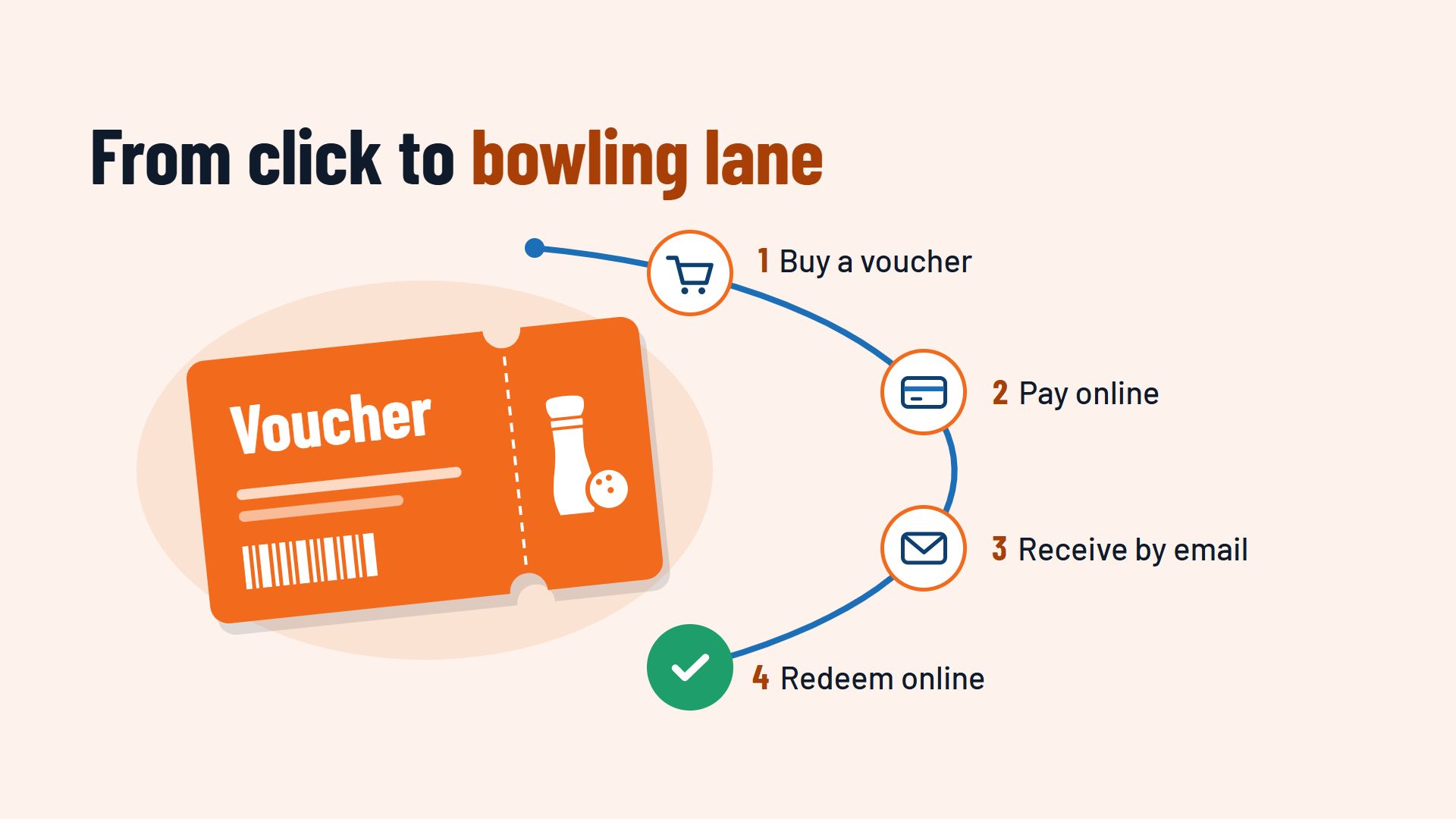
Selling bowling gift vouchers online means your guests can buy a voucher on your website around the clock, pay online straight away and receive it instantly as a PDF by email. It is redeemed later with a code, at the till or directly in the online booking. Your team does not have to print, post or keep track of anything by hand.
Why selling vouchers online pays off
A bowling night is a popular gift: for Christmas, a birthday, an anniversary or as a thank-you to a team. Gifts like these are often bought at short notice, sometimes the evening before the occasion. If the only way to get a voucher is at your counter, people buy a different present elsewhere.
An online bowling gift voucher solves this:
- Sales around the clock. The voucher is available on a Sunday evening or at midnight on 23 December.
- No work at the counter. Your team does not have to fill in, stamp or record vouchers in a book.
- New guests. Someone who receives a voucher as a gift may never have visited you before. And people rarely bowl alone, so a voucher often brings more guests with it.
- Income before the visit. The money is paid before the lane is booked. In the gift season before Christmas in particular, this brings in revenue at a time when lanes are in demand anyway.
Value voucher or experience voucher?
Before you offer digital bowling gift vouchers, decide which types you want to sell. There are two common types, and you can offer both side by side.
The value voucher
The buyer chooses an amount, and the recipient can redeem it for anything you offer: lanes, shoes, food and drink. A value voucher is flexible and suits buyers who do not know how many people will come along.
The experience or package voucher
Here the buyer gives a fixed experience, for example “One hour of bowling for four people with drinks” or a children's party package. A package voucher feels more personal as a gift, and the recipient knows straight away what to expect. How to put such packages together is covered in the article Selling food and drink with bowling bookings.
How purchase with online payment works
Buying a voucher should take no longer than reserving a lane. The buyer chooses the voucher or the amount, optionally adds a name and a message for the recipient, and pays.
Offer the same payment methods as for online booking, for example PayPal, credit card, Apple Pay or Google Pay. When voucher sales and bookings run in the same system, payments end up in one place and your accounts stay clear. You can read more in the article Online payment when booking.
Automatic delivery by email and as a PDF
After payment, the system creates the voucher automatically: a PDF with your logo, the value or the package, a personal message and a unique code. The buyer receives it by email straight away and can print it or forward it.
These help:
- A delivery date. The buyer decides that the voucher only reaches the recipient on their birthday.
- A design that looks like a gift. An attractive PDF is more likely to be printed and wrapped. A separate template for the Christmas season is worth it.
- A copy for your team. Every voucher sold is stored in the system, so your team can look it up and send it again if needed.
Redeeming the voucher: at the counter or online
A voucher only makes a good gift when it is easy to redeem.
Redemption in the online booking
The most convenient way is for the recipient to enter the code directly in the online booking. They choose the day, time and lane, enter the code, and the amount is deducted. If the voucher does not cover the total, they pay the rest online. Your team does not have to record anything, and the lane is firmly booked.
Redemption at the till
Some guests come spontaneously and show the voucher on their mobile phone. Your team scans or enters the code, and the system checks whether it is valid and how much balance is left. That way, no voucher is redeemed twice.
Partial redemption and remaining balance
With value vouchers, it is common for a guest to use only part of the amount. The system should deduct the amount redeemed and store the remaining balance under the same code. On the next visit, the guest can see what is left, and your team does not have to search through old notes.
Making vouchers visible on your website
A voucher shop that nobody can find does not sell anything. Make your online bowling gift voucher visible where your guests look:
- On the home page and in the menu, with a clear “Vouchers” item.
- Next to the online booking, so guests who are reserving a lane also think of a gift.
- In the gift seasons, with a notice on the website and on your channels, for example before Christmas, Mother's Day or Father's Day.
- At the counter, with a sign saying that vouchers are also available online.
- In confirmation emails after a booking, as a short note at the end.
What your booking system should offer for selling vouchers
To sell gift vouchers for your bowling centre online without creating extra work, your system should:
- sell value and package vouchers in your own online shop,
- take payment online, with the same payment methods as for bookings,
- send the voucher automatically as a PDF by email, on a set date if requested,
- let guests redeem the code in the online booking and at the till,
- store remaining balances and show each voucher with its current status,
- provide reports on how many vouchers have been sold, redeemed and are still open.
Conclusion: a gift your team does not have to handle
When you sell bowling gift vouchers online, your guests buy whenever the gift idea comes to them, and your team has no extra work either when the voucher is sold or when it is redeemed. What matters is that purchase, payment, delivery and redemption come together in one process.
Which other features a booking system should have is covered on the page Booking system for bowling centres. How voucher sales and online booking can run in one system can be seen, for example, at Flexybox.