Dynamic pricing means that a lane costs less on a quiet Tuesday afternoon than on a busy Saturday evening, and costs something different in the summer lull than in winter. That way you fill weak periods and make use of higher demand at peak times. The key is that your booking system applies the prices automatically for each time slot and guests see the price before they book.
From a single price to tiered prices
Many bowling centres already tier their prices roughly, for example cheaper from Monday to Thursday and more expensive on Friday and Saturday evenings. Dynamic pricing goes a step further: it sets prices more finely by time of day, season and actual occupancy.
A single price is simple, but it means lanes stay empty at quiet times while guests are turned away at the weekend. Why should an hour on the lane at 2 pm on a quiet Tuesday cost as much as one at 8 pm on a Saturday?
The benefits of dynamic and seasonal pricing
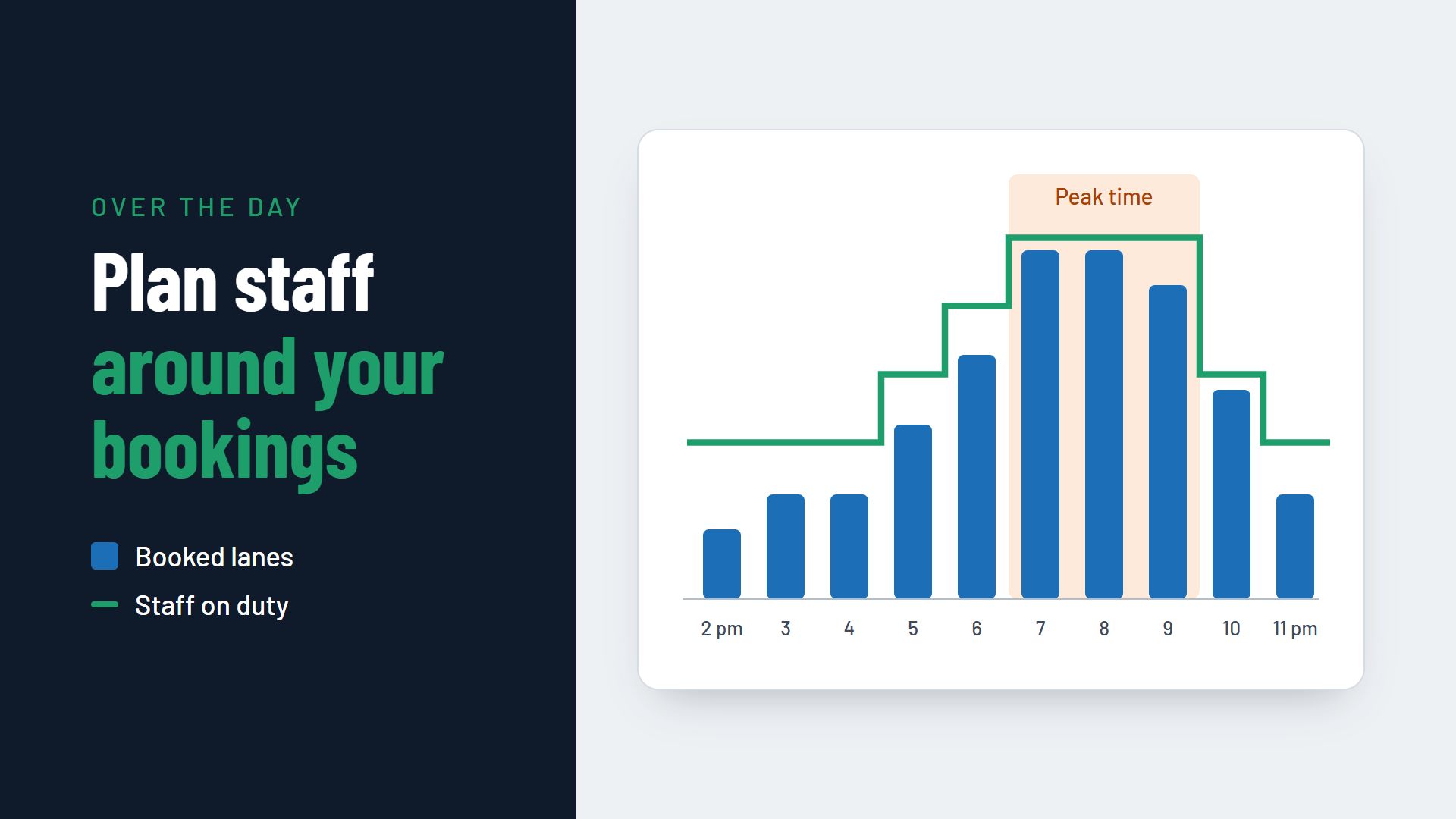
When your prices match demand, guests have a reason to choose quieter times. Occupancy spreads more evenly across the day and the week.
1. Better occupancy
Lower prices at quiet times attract more guests. At peak times, when demand is high, you can charge a higher price.
2. A better experience for your guests
When visitors are spread more evenly, peak times get less crowded. Your team has more time for service, and your guests wait less.
3. More flexibility
You can react quickly to special days. If an event nearby suddenly drives up demand, you adjust the prices for new bookings. It works the other way round too: if an international football match is on and the lanes stay empty, a short-notice promotional price can bring guests into the centre.
How to put dynamic pricing into practice
1. Analyse your data
Use your past bookings to spot patterns. When are the quiet times and when are the busy ones? Are there seasonal differences, for example during the summer holidays or before Christmas?
2. Set up pricing rules in your booking system
Decide which price applies to which weekday, time of day and season. Guests then automatically see the right price when they book online, and your team does not have to work anything out at the counter.
3. Test in small steps
Start with small changes and watch the results. Try different prices at different times to find out which changes affect demand without annoying your regulars.
4. Communicate openly
Show your price tiers openly on your website and in the booking step. Present differences as a benefit, for example as a “happy hour rate” or an “afternoon price”. Guests accept a discount at quiet times far more readily than a surcharge at the weekend.
5. Review and adjust
Dynamic pricing is not a one-off project. Review the results regularly and adjust your pricing rules.
Prices that suit your centre
With prices that match the weekday, the time of day and the season, you fill quiet periods better and make use of demand at peak times. Guests are happy to pay more for Saturday evening when they know they can play for less on a Tuesday.
You can read how to avoid no-shows on busy evenings in the article How to reduce no-shows in your bowling centre. Which features a booking system should offer for flexible pricing is covered on the page Booking system for bowling centres. One example of what this can look like in practice is Flexybox.